> ## Documentation Index
> Fetch the complete documentation index at: https://e2b.mintlify.site/llms.txt
> Use this file to discover all available pages before exploring further.
# Overview
> Connect to 200+ tools through the Model Context Protocol
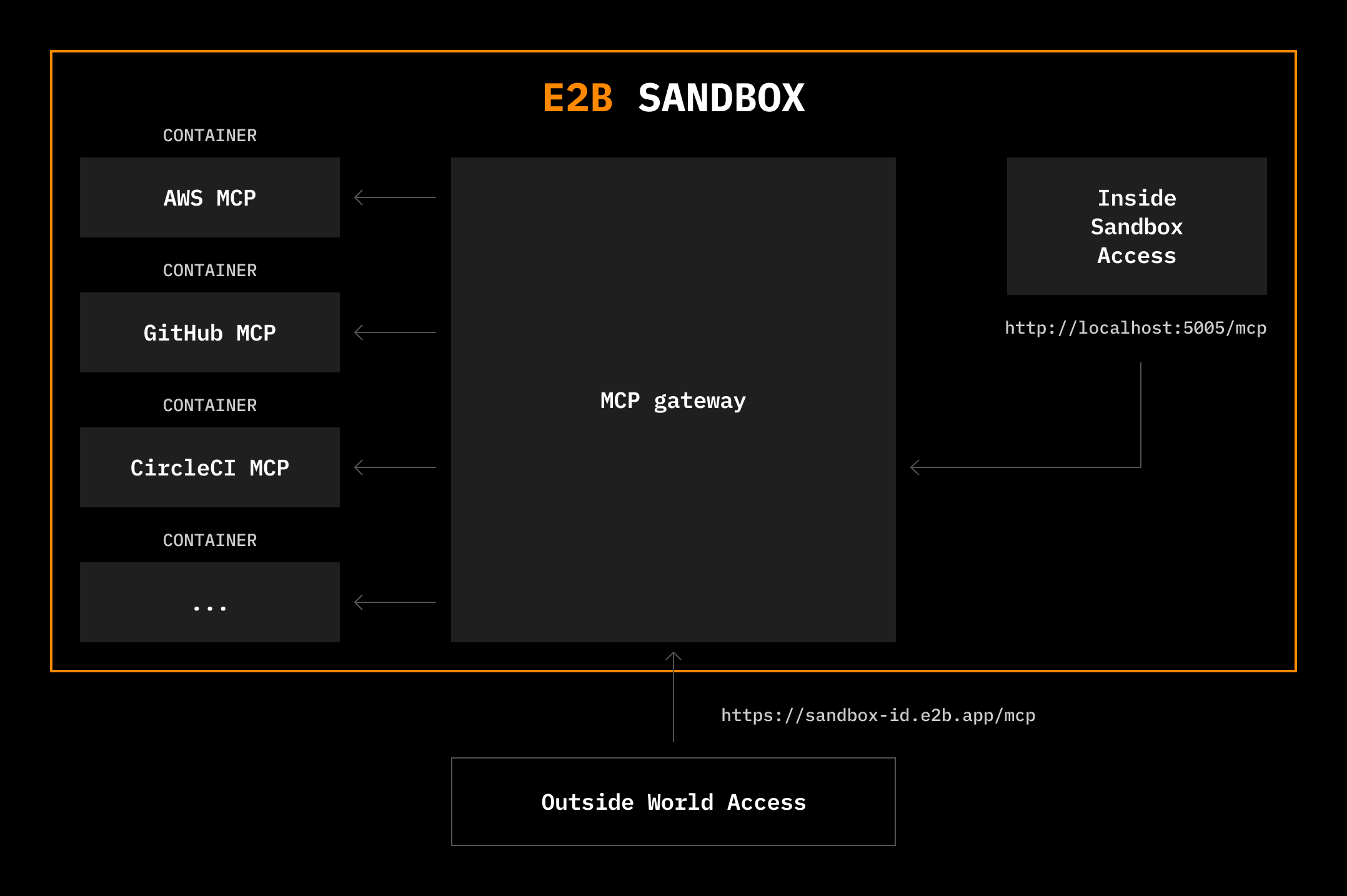
E2B provides a batteries-included MCP gateway that runs inside sandboxes, giving you type-safe access to 200+ MCP tools from the [Docker MCP Catalog](https://hub.docker.com/mcp) or [custom MCPs](/docs/mcp/custom-servers) through a unified interface. This integration gives developers instant access to tools like [Browserbase](https://www.browserbase.com/), [Exa](https://exa.ai/), [Notion](https://www.notion.so/), [Stripe](https://stripe.com/), or [GitHub](https://github.com/).
The [Model Context Protocol (MCP)](https://modelcontextprotocol.io/docs/getting-started/intro) is an open standard for connecting AI models to external tools and data sources. E2B sandboxes provide an ideal environment for running MCP tools, giving AI full access to an internet-connected Linux machine where it can safely install packages, write files, run terminal commands, and AI-generated code.
 ```typescript TypeScript theme={"theme":{"light":"github-light","dark":"github-dark-default"}}
import Sandbox from 'e2b'
const sbx = await Sandbox.create({
mcp: {
browserbase: {
apiKey: process.env.BROWSERBASE_API_KEY!,
geminiApiKey: process.env.GEMINI_API_KEY!,
projectId: process.env.BROWSERBASE_PROJECT_ID!,
},
exa: {
apiKey: process.env.EXA_API_KEY!,
},
airtable: {
airtableApiKey: process.env.AIRTABLE_API_KEY!,
},
},
});
const mcpUrl = sbx.getMcpUrl();
const mcpToken = await sbx.getMcpToken();
// You can now connect the gateway to any MCP client, for example claude:
// This also works for your local claude!
await sbx.commands.run(`claude mcp add --transport http e2b-mcp-gateway ${mcpUrl} --header "Authorization: Bearer ${mcpToken}"`, { timeoutMs: 0, onStdout: console.log, onStderr: console.log });
await sbx.commands.run(
`echo 'Use browserbase and exa to research open positions at e2b.dev. Collect your findings in Airtable.' | claude -p --dangerously-skip-permissions`,
{ timeoutMs: 0, onStdout: console.log, onStderr: console.log }
)
```
```python Python theme={"theme":{"light":"github-light","dark":"github-dark-default"}}
import asyncio
from e2b import AsyncSandbox
import os
import dotenv
dotenv.load_dotenv()
async def main():
sbx = await AsyncSandbox.create(mcp={
"browserbase": {
"apiKey": os.getenv("BROWSERBASE_API_KEY"),
"geminiApiKey": os.getenv("GEMINI_API_KEY"),
"projectId": os.getenv("BROWSERBASE_PROJECT_ID"),
},
"exa": {
"apiKey": os.getenv("EXA_API_KEY"),
},
"airtable": {
"airtableApiKey": os.getenv("AIRTABLE_API_KEY"),
},
})
mcp_url = sbx.get_mcp_url()
mcp_token = await sbx.get_mcp_token()
# You can now connect the gateway to any MCP client, for example claude:
# This also works for your local claude!
await sbx.commands.run(f'claude mcp add --transport http e2b-mcp-gateway {mcp_url} --header "Authorization: Bearer {mcp_token}"', timeout=0, on_stdout=print, on_stderr=print)
await sbx.commands.run(
"echo 'Use browserbase and exa to research open positions at e2b.dev. Collect your findings in Airtable.' | claude -p --dangerously-skip-permissions",
timeout=0, on_stdout=print, on_stderr=print
)
if __name__ == "__main__":
asyncio.run(main())
```
## Documentation
Get started with MCP
Browse 200+ pre-built MCP servers
Prepull MCP servers for faster runtime
Use custom MCP servers from GitHub
See examples
```typescript TypeScript theme={"theme":{"light":"github-light","dark":"github-dark-default"}}
import Sandbox from 'e2b'
const sbx = await Sandbox.create({
mcp: {
browserbase: {
apiKey: process.env.BROWSERBASE_API_KEY!,
geminiApiKey: process.env.GEMINI_API_KEY!,
projectId: process.env.BROWSERBASE_PROJECT_ID!,
},
exa: {
apiKey: process.env.EXA_API_KEY!,
},
airtable: {
airtableApiKey: process.env.AIRTABLE_API_KEY!,
},
},
});
const mcpUrl = sbx.getMcpUrl();
const mcpToken = await sbx.getMcpToken();
// You can now connect the gateway to any MCP client, for example claude:
// This also works for your local claude!
await sbx.commands.run(`claude mcp add --transport http e2b-mcp-gateway ${mcpUrl} --header "Authorization: Bearer ${mcpToken}"`, { timeoutMs: 0, onStdout: console.log, onStderr: console.log });
await sbx.commands.run(
`echo 'Use browserbase and exa to research open positions at e2b.dev. Collect your findings in Airtable.' | claude -p --dangerously-skip-permissions`,
{ timeoutMs: 0, onStdout: console.log, onStderr: console.log }
)
```
```python Python theme={"theme":{"light":"github-light","dark":"github-dark-default"}}
import asyncio
from e2b import AsyncSandbox
import os
import dotenv
dotenv.load_dotenv()
async def main():
sbx = await AsyncSandbox.create(mcp={
"browserbase": {
"apiKey": os.getenv("BROWSERBASE_API_KEY"),
"geminiApiKey": os.getenv("GEMINI_API_KEY"),
"projectId": os.getenv("BROWSERBASE_PROJECT_ID"),
},
"exa": {
"apiKey": os.getenv("EXA_API_KEY"),
},
"airtable": {
"airtableApiKey": os.getenv("AIRTABLE_API_KEY"),
},
})
mcp_url = sbx.get_mcp_url()
mcp_token = await sbx.get_mcp_token()
# You can now connect the gateway to any MCP client, for example claude:
# This also works for your local claude!
await sbx.commands.run(f'claude mcp add --transport http e2b-mcp-gateway {mcp_url} --header "Authorization: Bearer {mcp_token}"', timeout=0, on_stdout=print, on_stderr=print)
await sbx.commands.run(
"echo 'Use browserbase and exa to research open positions at e2b.dev. Collect your findings in Airtable.' | claude -p --dangerously-skip-permissions",
timeout=0, on_stdout=print, on_stderr=print
)
if __name__ == "__main__":
asyncio.run(main())
```
## Documentation
Get started with MCP
Browse 200+ pre-built MCP servers
Prepull MCP servers for faster runtime
Use custom MCP servers from GitHub
See examples